Industrial CCTV systems must provide clear operational visibility while respecting privacy requirements. In factories, warehouses, manufacturing plants, offices, and critical infrastructure facilities, cameras often monitor production lines, machinery, access points, loading bays, and restricted zones.
However, not every area should remain visible to surveillance operators.
Employee workstations, changing areas, neighbouring properties, confidential workspaces, medical rooms, and other sensitive locations may require visual protection. Simply turning off a camera is not always a practical solution because it can create surveillance blind spots and reduce operational awareness.
This is where industrial CCTV privacy masking becomes important.
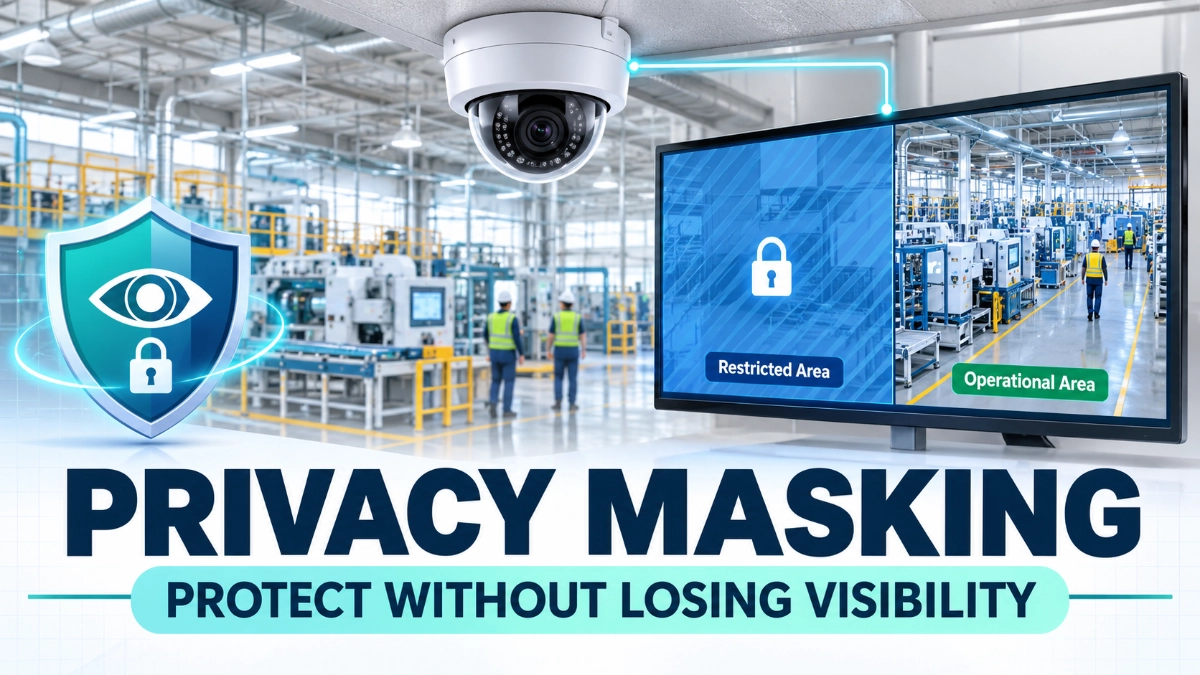
Privacy masking allows engineers to conceal selected portions of a camera’s field of view while keeping the remaining area visible for security and operational monitoring. When designed correctly, it helps organisations balance privacy, security, and surveillance performance without unnecessarily compromising camera coverage.
But privacy masking involves more than placing a black rectangle over an image. Engineers must consider camera positioning, mask geometry, recording behaviour, analytics, PTZ movement, NVR compatibility, and future changes to the industrial environment.
In this article, we explore how CCTV privacy masking works, where engineers should apply it, and how to maintain reliable surveillance without exposing restricted areas.
What Is Industrial CCTV Privacy Masking?
Industrial CCTV privacy masking is a surveillance feature that conceals selected portions of a camera’s video image to prevent operators from viewing sensitive or restricted areas.
It allows security teams to monitor important operational activities while protecting areas that do not require surveillance.
For example, a factory camera can monitor a production line and equipment movement while masking an employee rest area located within the same camera view.
Privacy masking can be implemented through camera-level features or video management systems, depending on the equipment and system architecture.
The correct implementation should protect sensitive areas across relevant video streams, recordings, live views, snapshots, and exported footage, not simply hide them on one monitoring screen.
1. Why Privacy Masking Matters in Industrial CCTV Systems
Industrial environments frequently contain multiple operational and restricted areas within a single camera’s field of view.
Consider a manufacturing facility where one camera covers:
- Production machinery
- Material movement areas
- Employee workstations
- A restricted administrative section
- A nearby access corridor
The security team needs visibility into machinery movement and access activities. However, continuous visibility into certain employee or confidential areas may be unnecessary.
Disabling the camera would reduce operational coverage. Moving the camera might introduce blind spots elsewhere.
Privacy masking offers another approach.
It allows engineers to define specific areas that should remain concealed while maintaining visibility across the rest of the scene.
Key Benefits of Privacy Masking
1. Better privacy protection: Sensitive locations remain concealed from routine surveillance viewing.
2. Continuous operational monitoring: Security teams can continue observing machinery, entrances, production lines, and material movement.
3. Reduced unnecessary exposure: Operators do not need access to visual information from areas unrelated to their responsibilities.
4. Improved surveillance planning: Engineers can design camera coverage around operational requirements and privacy boundaries.
5. Better access governance: When combined with role-based permissions and suitable recording policies, masking can become part of a broader privacy management strategy.
The important point is that privacy and surveillance should not be treated as competing objectives. A properly designed system can support both.
2. How CCTV Privacy Masking Works
Privacy masking works by defining a specific region within the camera image that the system should conceal.
The camera or supported video processing system applies a visual mask to that region.
For example, imagine a camera monitoring a warehouse entrance and an employee seating area.
An engineer can configure a privacy mask over the seating area while leaving the entrance and surrounding movement visible.
Depending on the camera and platform, privacy masking may support:
- Fixed rectangular masking
- Polygon-based masking
- Multiple privacy zones
- Different mask colours
- Masking during camera movement
- Device-level or server-side video masking
Not every camera supports every feature. Engineers should verify the actual capabilities of the selected camera and recording platform.
Camera-Level vs VMS-Level Privacy Masking
This distinction is particularly important during system design.
| Feature | Camera-level masking | VMS-level masking |
|---|---|---|
| Processing | Inside the camera | Within the video management platform |
| Camera stream | Can be masked before transmission | May be processed after stream reception |
| Network transmission | Sensitive image regions can be concealed before transmission when masking is applied to the transmitted stream | Original video may reach the server |
| Compatibility | Depends on camera support | Depends on VMS support |
| Application | Device-level privacy protection | Centralised video management |
Engineering consideration: Do not assume that a mask visible in a VMS live-view layout also protects the original camera stream or recorded footage. Verify where the masking occurs and which outputs it covers.
For stronger privacy protection, engineers should evaluate whether masking is applied before video leaves the camera and whether any unmasked stream remains accessible through another interface.
3. How to Protect Restricted Areas Without Losing Operational Visibility
The biggest challenge in industrial CCTV privacy masking is maintaining useful surveillance coverage.
A poorly positioned mask can conceal important activities or create monitoring gaps.
Engineers should therefore identify the operational purpose of each camera before defining privacy zones.
Identify Critical Monitoring Areas
Start by identifying the activities that the camera must capture.
These may include:
- Machine operation
- Conveyor belt movement
- Production line activity
- Material loading and unloading
- Emergency exits
- Restricted access points
- Equipment movement
Next, identify locations that require privacy protection.
The objective is to separate necessary operational visibility from unnecessary visual exposure.
Example: Factory Production Floor
Suppose a factory camera covers a conveyor belt, a machinery control station, and an employee rest area.
A practical masking strategy would:
- Keep the conveyor belt visible.
- Maintain visibility around machinery.
- Preserve coverage of relevant access routes.
- Apply a privacy mask to the employee rest area.
- Verify that the mask does not conceal safety-critical activity.
This approach allows security teams to monitor industrial operations without unnecessarily exposing sensitive spaces.
4. Camera Positioning and Privacy Mask Design
Privacy masking starts with camera placement.
If engineers install a camera without considering nearby restricted areas, they may need to apply large masks that reduce the useful viewing area.
A better approach is to plan privacy zones during the CCTV design stage.
Important Design Considerations
- Camera angle: Select an angle that captures the required operational area without unnecessarily including sensitive spaces.
- Mounting height: An appropriate mounting height can help reduce unwanted visibility while maintaining coverage.
- Field of view: Choose a lens and viewing angle that provide the required coverage without capturing excessive background areas.
- Mask boundaries: Position masks carefully so they conceal the entire sensitive area without covering nearby operational activities.
- Lighting conditions: Check mask visibility during daylight, low-light conditions, and infrared operation.
- Future changes: Consider whether machinery relocation, new partitions, or layout modifications could change the camera’s viewing area.
A useful engineering practice is to review camera views on-site before finalising privacy mask positions.
5. Privacy Masking in Fixed, Bullet and Dome Cameras
Different camera types create different design considerations.
Bullet Cameras
Bullet cameras generally provide a directional viewing arrangement. Engineers often use them to monitor specific production areas, warehouse aisles, loading zones, and perimeter boundaries.
When configuring privacy masks, check whether the selected camera supports the required number of privacy zones and whether those zones remain correctly positioned after changing zoom, focus, or camera orientation.
For projects considering Impact by Honeywell bullet cameras, engineers should verify the exact model’s privacy masking capabilities before finalising the design.
Dome Cameras
Dome cameras are commonly selected for indoor environments, corridors, commercial facilities, and production areas.
Their positioning and viewing angle can make them useful for monitoring multiple activities within one scene.
However, engineers should verify how privacy masks behave when the camera’s orientation or supported pan, tilt, or zoom functions change.
For installations involving Impact by Honeywell dome cameras, confirm the model-specific masking functionality and its compatibility with the intended recording arrangement.
Important: Camera form factor alone does not determine privacy functionality. Always consult the manufacturer’s technical documentation for the specific model.
6. How Privacy Masking Affects NVR Recording
One of the most important considerations is how privacy masks interact with recording.
A common mistake is assuming that if a restricted area appears concealed on the monitoring screen, it is automatically concealed in every recorded video.
This is not always true.
The result depends on whether the masking occurs inside the camera, within the NVR, or through the VMS interface.
Consider three different situations:
| Situation | Potential privacy concern |
|---|---|
| Camera-level masking | Confirm that the transmitted recording stream contains the mask |
| NVR/VMS masking | Original unmasked footage may be available elsewhere |
| Live-view-only masking | Recorded footage or exported video may reveal the restricted area |
What Engineers Should Verify
Before commissioning the system, check:
- Live-view masking
- Continuous recording
- Scheduled recording
- Motion-based recording
- Playback
- Snapshot capture
- Video export
- Remote viewing
- Secondary streams
- Mobile application viewing
- Backup and failover recording
This is particularly important when using multi-channel Impact by Honeywell NVRs in larger industrial surveillance projects.
Engineers should verify the actual masking behaviour of the camera and recorder combination instead of assuming that compatibility guarantees identical privacy behaviour across every function.
7. Privacy Masking and Video Analytics: What Engineers Should Know
Modern industrial CCTV systems increasingly use video analytics to identify movement, detect unusual activities, monitor restricted access, and improve security operations.
However, privacy masking can affect how analytics operate.
For example, consider a camera monitoring a restricted warehouse entrance.
If the mask overlaps the entrance or detection area, the system may lose the visual information required for accurate analytics.
Possible effects include:
- Reduced motion detection accuracy
- Incorrect object detection
- Missed line-crossing events
- Incomplete intrusion detection
- Reduced people-counting accuracy
- Incorrect activity classification
The exact impact depends on where analytics processing occurs and how the manufacturer implements masking.
How to Avoid Analytics Problems
- Identify the analytics zones before applying masks.
- Keep important detection areas outside privacy zones.
- Check whether analytics operate on masked or unmasked video.
- Test detection performance after configuration.
- Verify alarms and event recordings.
- Recheck analytics whenever camera positioning changes.
Engineering insight: A privacy mask should protect a sensitive area without unnecessarily interfering with the visual information needed to detect relevant security events.
8. Privacy Masking in PTZ Cameras and Moving Surveillance Systems
PTZ cameras introduce additional challenges because their viewing direction can change.
A fixed privacy mask may not protect the same physical location when a camera pans, tilts, or zooms.
For example, a camera may initially face a production area with a restricted office behind it. When the operator changes the viewing direction, the camera may capture that office directly.
Engineers should investigate whether the selected PTZ camera supports dynamic or position-aware privacy masking.
Important checks include:
- Mask behaviour during pan and tilt
- Mask behaviour during optical zoom
- Preset position configuration
- Privacy protection during automated tours
- Behaviour after power restoration
- Mask persistence after firmware updates
Do not assume that a mask configured for one PTZ position automatically protects the same physical area at every other position.
9. Common Industrial CCTV Privacy Masking Mistakes
Even a technically capable CCTV system can create privacy issues when engineers overlook configuration details.
Here are some common mistakes to avoid.
| Common mistake | Potential consequence |
|---|---|
| Applying oversized masks | Loss of operational visibility |
| Masking without a site survey | Important activities become concealed |
| Testing only live view | Unmasked recordings may remain accessible |
| Ignoring secondary streams | Privacy protection may be inconsistent |
| Overlooking PTZ movement | Restricted areas may become visible |
| Ignoring analytics zones | Detection performance may decrease |
| Not reviewing exported footage | Sensitive information may be exposed |
| Failing to document masks | Future maintenance becomes difficult |
One particularly serious mistake is failing to review privacy masks after physical changes to the facility.
A relocated machine, newly installed partition, or modified camera angle can change the relationship between the mask and the restricted area.
Therefore, privacy masking should be part of ongoing CCTV maintenance rather than a one-time commissioning activity.
10. Best Practices for Implementing Industrial CCTV Privacy Masking
Engineers can follow a structured process to implement privacy masking effectively.
Step 1: Conduct a site assessment
Identify sensitive locations, operational requirements, camera positions, and required surveillance coverage.
Step 2: Define privacy boundaries
Determine which portions of the camera view require masking and why.
Step 3: Select compatible equipment
Check camera specifications, masking capabilities, supported video streams, NVR compatibility, and VMS functionality.
Step 4: Configure privacy zones
Apply masks carefully and verify their boundaries against the actual physical environment.
Step 5: Test all video outputs
Review live view, recordings, playback, snapshots, exports, remote viewing, and secondary streams.
Step 6: Verify analytics
Confirm that intrusion detection, motion detection, and other required functions continue to operate correctly.
Step 7: Document the configuration
Maintain records of camera IDs, mask positions, configuration settings, approval requirements, and testing results.
Step 8: Schedule periodic reviews
Reassess privacy zones after camera relocation, firmware upgrades, facility modifications, or changes in operational requirements.
11. Choosing the Right CCTV Equipment for Privacy-Focused Industrial Projects
Privacy masking should be considered during equipment selection, not added as an afterthought.
Engineers evaluating Impact by Honeywell CCTV should assess the complete surveillance architecture, including cameras, recording devices, network infrastructure, and monitoring requirements.
The following factors deserve attention:
- Supported privacy masking features
- Number of configurable privacy zones
- Mask behaviour across video streams
- Compatibility with the selected NVR
- PTZ masking capabilities, where applicable
- Analytics compatibility
- Firmware and configuration management
- Recording and export behaviour
For industrial projects in India, organisations sourcing equipment through an Impact by Honeywell distributor in India should verify the exact product specifications and available technical documentation before selecting equipment.
The goal is to select equipment that supports the project’s operational and privacy requirements without creating unnecessary limitations in surveillance coverage.
12. Industrial CCTV Privacy Masking: Engineer’s Commissioning Checklist
Use this checklist before handing over a privacy-focused CCTV installation.
- Identify all restricted and sensitive areas.
- Complete a camera coverage assessment.
- Confirm camera-level masking capabilities.
- Verify mask boundaries and positioning.
- Check main stream and sub-stream behaviour.
- Test live viewing and continuous recording.
- Verify playback and exported footage.
- Check mobile and remote viewing.
- Test video analytics and motion detection.
- Verify PTZ privacy protection, where applicable.
- Document approved privacy zones.
- Confirm access permissions.
- Schedule periodic configuration reviews.
This process helps engineers confirm that privacy protection works throughout the surveillance system rather than only on the operator’s display.
Conclusion: Privacy and Operational Visibility Must Work Together
Industrial CCTV privacy masking is an important part of modern surveillance design. It helps organisations protect sensitive areas without unnecessarily sacrificing security coverage or operational awareness.
However, effective privacy masking requires more than configuring a few visual zones.
Engineers must understand camera positioning, masking architecture, NVR recording behaviour, video analytics, PTZ movement, and system compatibility.
A mask that works correctly in live view but fails during recording or video export does not provide complete privacy protection.
The most reliable approach is to plan privacy requirements during system design, select compatible equipment, test every relevant video output, and periodically review configurations.
The objective is simple: protect what should remain private while keeping the areas that matter operationally visible.
For industrial engineers and system integrators, this balance is what makes a CCTV system both practical and privacy-conscious.
Read Also: CCTV Camera Health Monitoring: How to Detect Problems Before Operators Report Them
Read Also: Camera Coverage After Factory Layout Changes: How to Identify New Surveillance Blind Spots