A CCTV system can work reliably for years and still develop unexpected problems after a firmware update, network change, or configuration adjustment.
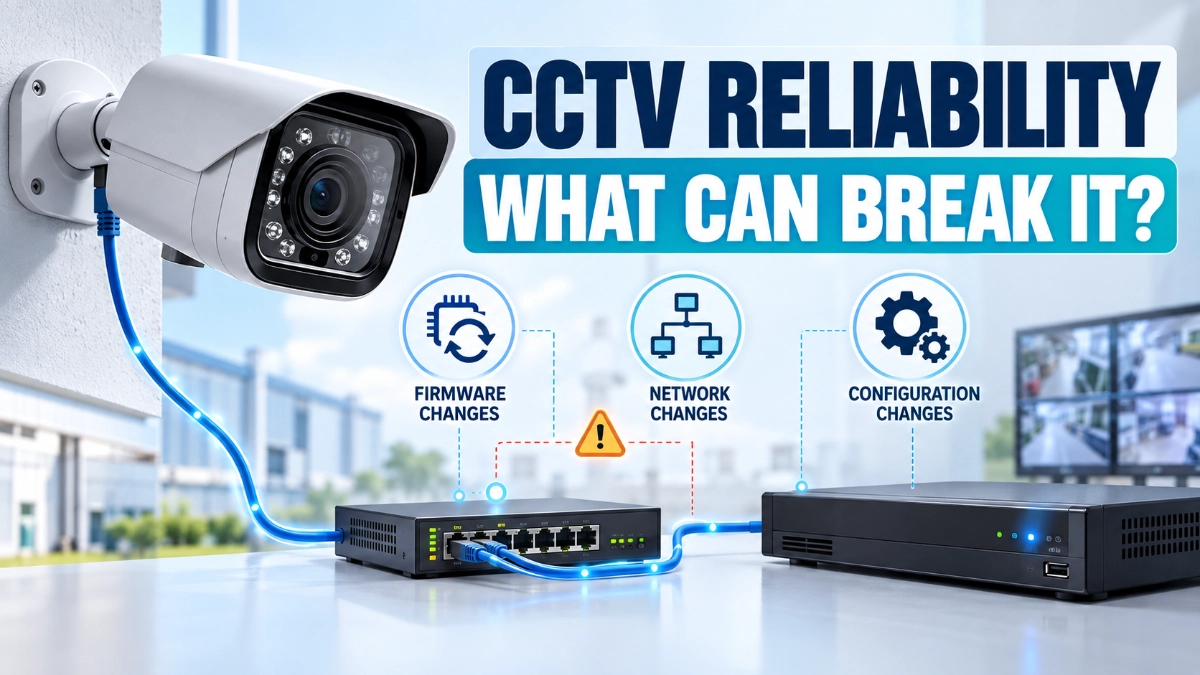
The cameras may remain powered on. The NVR may still be accessible. Network switches may show normal link status. Yet operators can experience video loss, delayed live feeds, recording gaps, camera disconnections, or missing alerts.
The reason is simple: modern CCTV systems are no longer isolated video devices. They are interconnected IP systems that depend on firmware, network communication, device configuration, recording parameters, storage, and interoperability working together.
A change in one layer can affect another.
For engineers, system integrators, IT teams, and facility managers, understanding these dependencies is essential for maintaining CCTV reliability.
Quick Answer: What Can Affect CCTV Reliability?
Firmware updates, network changes, and configuration modifications can affect CCTV reliability by changing device behaviour, communication protocols, bandwidth requirements, authentication, video streams, recording settings, or interoperability between cameras and NVRs.
A firmware update can introduce new features or security fixes but may also change default settings or compatibility behaviour. Network changes can cause packet loss, latency, VLAN issues, or insufficient bandwidth. Configuration changes can alter resolution, frame rate, compression, recording schedules, motion detection, or stream profiles.
The safest approach is to document the existing system, test changes in a controlled manner, verify camera-to-NVR communication, and monitor the system after implementation.
Why CCTV Reliability Depends on More Than the Camera
When engineers troubleshoot a CCTV system, the first instinct is often to inspect the camera.
But an IP surveillance system has several interconnected layers:
Camera → Network → Switch → NVR/VMS → Storage → Client/Operator
A problem at any point can affect the final video experience.
For example, a camera may generate a perfectly healthy video stream, but a network switch could introduce packet loss. Similarly, the network may operate correctly while an NVR configuration prevents the expected stream from being recorded.
This is why CCTV reliability should be treated as a system-level engineering issue, rather than simply a camera specification.
Modern interoperability standards reinforce this principle. ONVIF profiles define standardised features that allow conformant cameras and clients to communicate, but compatibility still depends on the supported profile, device capabilities, and firmware/software versions involved.
1. How Firmware Updates Can Affect CCTV Reliability
Firmware is the software embedded inside a camera, NVR, network device, or other security product.
Manufacturers release firmware updates for several reasons:
- Security improvements
- Bug fixes
- New features
- Performance improvements
- Protocol updates
- Hardware compatibility
- Stability improvements
- Vulnerability remediation
Regularly updating firmware is an important part of maintaining a secure surveillance environment. CISA’s cybersecurity guidance also recommends regularly updating firmware and software.
However, firmware changes should still be treated as controlled engineering changes, particularly in large or critical CCTV deployments.
Firmware Can Change Device Behaviour
An update may modify:
- Video encoding behaviour
- Bitrate control
- ONVIF functionality
- Authentication mechanisms
- HTTPS settings
- User permissions
- Event handling
- Motion detection
- Audio configuration
- Time synchronization
- Network settings
- Storage behavior
A camera that previously communicated correctly with an NVR may therefore behave differently after an update.
ONVIF’s conformance information is particularly important here because conformance is tied to a specific firmware/software version.
Example
Suppose an IP camera previously used H.264 at a particular bitrate and the NVR was configured around that stream.
After a firmware upgrade, the camera could change available encoding options or introduce a different stream configuration.
The camera still works.
The network still works.
The NVR still works.
But the combination may no longer behave exactly as it did before.
That is why engineers should verify the complete video path after firmware changes.
2. Network Changes Can Create Hidden CCTV Problems
Network architecture is one of the most important factors in IP CCTV reliability.
A camera may require continuous communication with an NVR or VMS. If the network introduces excessive latency, packet loss, congestion, or incorrect routing, video performance can degrade.
Common network-related problems include:
- Incorrect VLAN configuration
- IP address conflicts
- DHCP changes
- Poor switch configuration
- Insufficient uplink bandwidth
- Packet loss
- Network congestion
- Incorrect routing
- Firewall restrictions
- Multicast configuration problems
- PoE-related issues
- DNS or gateway changes
- Incorrect QoS settings
Bandwidth Is Especially Important
Consider a deployment with multiple high-resolution cameras.
If each camera produces a continuous stream, the aggregate bandwidth can become significant.
For example:
20 cameras × 6 Mbps = 120 Mbps
That calculation does not include additional traffic, secondary streams, management traffic, overhead, or future expansion.
If engineers later increase camera resolution or bitrate, the network requirement can increase without any physical change to the cabling.
This is one reason why network capacity should be reviewed before changing video parameters across a large deployment.
3. VLAN Changes Can Disconnect Cameras Without Physically Disconnecting Them
VLAN segmentation is commonly used to separate CCTV traffic from corporate or other operational networks.
This can improve network organisation and security, but configuration errors can interrupt communication.
For example:
Camera VLAN → CCTV Switch → Core Switch → NVR VLAN
If the trunk configuration changes and the CCTV VLAN is no longer carried correctly, cameras may remain powered and show link activity while becoming unreachable from the NVR.
This can create a confusing troubleshooting scenario.
The physical infrastructure appears healthy, but the logical network path is broken.
What Engineers Should Verify
After a VLAN change, check:
- Camera IP address
- Subnet
- Default gateway
- VLAN assignment
- Switch port configuration
- Trunk configuration
- Routing
- Firewall rules
- NVR reachability
- Video stream availability
A simple ping test is useful, but it is not enough.
A camera can respond to network traffic while still experiencing problems with video streaming, authentication, or recording.
4. Configuration Changes Can Affect Video Quality
CCTV reliability is not only about whether a camera is online.
The system must also deliver usable video.
Changing the following parameters can significantly affect system performance:
- Resolution
- Frame rate
- Bitrate
- GOP structure
- H.264/H.265 encoding
- Constant or variable bitrate
- Main stream
- Sub-stream
- I-frame interval
- Smart codec settings
- Image processing
- Audio settings
For example, increasing a camera from a lower resolution to a higher resolution can increase storage and bandwidth requirements.
Increasing frame rate can have a similar effect.
Therefore, better image quality does not automatically mean better system performance.
Engineers should evaluate image quality against available network bandwidth, NVR capacity, storage requirements, and application needs.
5. Main Stream and Sub-Stream Changes Matter
Many modern CCTV systems use multiple video streams.
A typical configuration may include:
Main stream: High-quality recording
Sub-stream: Lower-bandwidth viewing
This architecture allows operators to view cameras efficiently while preserving higher-quality recordings.
However, configuration changes can affect how the NVR or VMS uses these streams.
For example, changing the sub-stream resolution or codec can affect:
- Remote viewing
- Multi-camera display
- Mobile applications
- NVR decoding load
- Client performance
When troubleshooting a CCTV system, engineers should therefore check which stream is being used, rather than assuming every application uses the same video stream.
6. NVR Configuration Changes Can Cause Recording Problems
The NVR is responsible for more than storing video.
Depending on the system, it may manage:
- Camera connections
- Recording schedules
- Stream selection
- Motion recording
- Event recording
- Storage allocation
- User permissions
- Playback
- Network settings
- Time synchronization
- Analytics
A configuration change can therefore create a recording problem even when live video continues to work.
A Common Example
An engineer changes a camera’s recording configuration.
Live viewing works normally.
However, the NVR is now recording a different stream, or the recording schedule no longer matches the intended operating period.
The operator may only discover the issue when trying to retrieve footage.
This highlights an important principle:
Live video availability does not prove that recording is working correctly.
After configuration changes, always test both live viewing and recorded playback.
7. Time Synchronisation Is Often Overlooked
Accurate time is critical in surveillance systems.
Imagine an incident occurs at 14:35.
If one camera is several minutes ahead while another is behind, investigators may struggle to correlate events across cameras.
Firmware updates, network changes, NTP configuration changes, or manual settings can affect device time synchronisation.
Engineers should verify:
- Time zone
- NTP server
- Date
- Time
- Synchronization status
- NVR time
- Camera time
- Daylight-saving configuration where applicable
Consistent timestamps make multi-camera investigation significantly easier.
8. Firmware and ONVIF Compatibility Should Be Checked Together
Multi-vendor CCTV deployments often depend on interoperability.
ONVIF provides standardised profiles for different surveillance functions. For example, Profile T supports advanced video streaming features including H.264/H.265, imaging settings, motion and tampering events, and metadata streaming. Profile G addresses recording and retrieval functions.
However, engineers should not assume that a device will support every feature simply because it supports ONVIF.
ONVIF explains that profiles contain mandatory and conditional features, so compatibility should be checked against the specific functionality required.
This becomes particularly important after firmware updates.
Before Updating Firmware, Record:
- Current firmware version
- ONVIF profile support
- Camera model
- NVR/VMS version
- Existing stream settings
- Authentication method
- Recording configuration
- Network configuration
This creates a baseline for troubleshooting if something changes after the update.
9. Security Changes Can Also Affect Availability
Security and reliability are closely connected.
Changing authentication, encryption, firewall rules, access controls, or network segmentation can affect whether cameras and NVRs can communicate.
For example, a security hardening change may block a service that the NVR previously used.
The objective should therefore be:
Improve security without unintentionally breaking required surveillance functions.
CISA recommends measures such as strong passwords, regular firmware/software updates, network segmentation, encryption, and traffic controls as part of broader cybersecurity practices.
This is particularly relevant for network-connected cameras because surveillance infrastructure can become part of an organization’s broader IT environment.
10. How Engineers Should Manage CCTV Changes
A structured change-management process can prevent many reliability problems.
Step 1: Document the Existing System
Before making changes, record:
- Camera IP addresses
- Firmware versions
- NVR firmware
- Camera models
- VLAN information
- Switch ports
- Video settings
- Recording settings
- NTP configuration
- User/access settings
Step 2: Define the Change
Clearly document what will change.
For example:
Upgrade camera firmware from version X to version Y.
or:
Move CCTV cameras from VLAN 30 to VLAN 40.
Avoid combining several unrelated changes at the same time unless necessary.
Step 3: Test a Small Group
Instead of updating 100 cameras simultaneously, test a representative sample first.
Check:
- Live video
- Recording
- Playback
- Events
- Analytics
- Network connectivity
- Remote access
- Time synchronization
Step 4: Compare Against the Baseline
Compare the post-change configuration with the original configuration.
Look for unexpected changes in:
- Bitrate
- Resolution
- Codec
- IP settings
- Authentication
- Recording
- Event rules
Step 5: Monitor After Deployment
Do not consider the job complete immediately after the update.
Monitor:
- Camera uptime
- Network errors
- Packet loss
- Recording status
- Storage health
- NVR alarms
- Video quality
- Client connectivity
11. Where Camera Selection Fits Into Reliability
Hardware selection still matters, but engineers should evaluate the complete ecosystem rather than focusing only on megapixels or individual camera specifications.
For example, when evaluating Impact by Honeywell CCTV, consider how the selected cameras, NVRs, network infrastructure, recording requirements, and deployment environment will work together.
Different applications may call for different camera designs. Impact by Honeywell bullet cameras can be considered where the installation requires a directional camera form factor, while Impact by Honeywell dome cameras may suit applications where a more discreet or compact camera form factor is preferred.
Similarly, Impact by Honeywell NVR’s should be evaluated as part of the complete recording architecture, including camera count, supported resolutions, recording requirements, storage capacity, and network design.
For organisations sourcing equipment in India, working with an Impact by Honeywell distributor in India can also help engineers verify current product specifications and availability before finalising a system design.
The key point is that camera selection should follow the application and system architecture, not the other way around.
CCTV Reliability Checklist for Engineers
Before and after a firmware, network, or configuration change, use this quick checklist:
Firmware
- Record current firmware
- Review release notes
- Verify compatibility
- Maintain a rollback plan
- Test representative devices
Network
- Verify IP addresses
- Check VLAN configuration
- Verify switch ports
- Check bandwidth
- Test packet loss and latency
- Review firewall rules
- Check PoE status
Configuration
- Verify resolution
- Check frame rate
- Review bitrate
- Confirm codec
- Check main/sub-stream settings
- Verify recording schedules
- Check motion/event settings
NVR/VMS
- Confirm camera connectivity
- Test live view
- Test recording
- Test playback
- Check storage
- Verify alerts
- Check user access
Time
- Confirm time zone
- Verify NTP
- Check camera timestamps
- Check NVR timestamp
Final Takeaway
CCTV reliability is a system property, not simply a camera property.
Firmware updates can change device behaviour. Network modifications can interrupt communication. Configuration changes can alter bandwidth, recording, video quality, or interoperability.
The best way to manage these risks is to treat CCTV modifications as controlled engineering changes.
Document the baseline. Understand the dependencies. Test before full deployment. Verify live video and recording. Monitor the system after implementation.
This approach becomes increasingly important as surveillance systems move toward higher-resolution cameras, AI analytics, network integration, and more sophisticated video management.
For engineers, the goal is not simply to keep every camera online.
The goal is to ensure that the complete surveillance system continues to deliver the right video, to the right recorder, across the right network, at the required quality and time.
Read Also: NVR Capacity vs Actual CCTV Storage Demand: What Engineers Should Check
Read Also: How VLAN Segmentation Can Improve Enterprise CCTV Architecture