A CCTV system may serve the same building, but not everyone who uses it needs the same information.
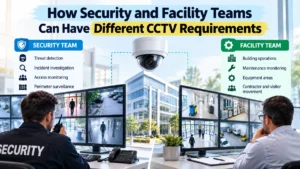
A security team may want cameras that help detect suspicious activity, verify incidents, monitor restricted areas and support investigations. A facility team, on the other hand, may use CCTV to understand building operations, investigate equipment issues, monitor access points, support maintenance activities and improve situational awareness.
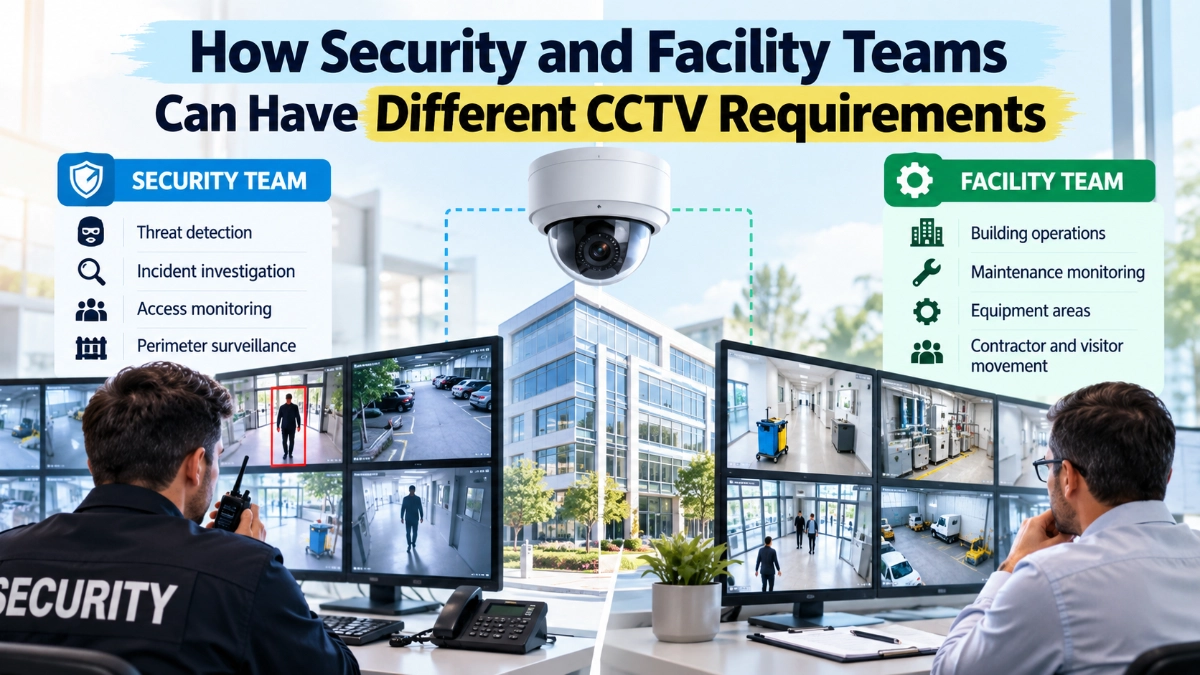
Both teams may look at the same camera, but their expectations can differ greatly.
This difference is important when designing commercial and industrial surveillance systems. If engineers design the CCTV system around only one department’s requirements, the final installation may provide excellent video but still fail to support important operational needs.
The better approach is to treat CCTV as a shared operational platform and define requirements according to the people, risks and decisions the system needs to support.
Why Do Security and Facility Teams Need Different CCTV Systems?
Security and facility teams have different CCTV requirements because they use video for different purposes.
Security teams generally prioritise:
- Incident detection
- Intrusion monitoring
- Access verification
- Evidence collection
- Perimeter surveillance
- High-risk area monitoring
- Real-time security alerts
Facility teams may prioritise:
- Building operations
- Equipment monitoring
- Maintenance activities
- Visitor and contractor movement
- Loading and service areas
- Occupancy awareness
- Incident investigation
- Operational coordination
The same camera can sometimes support both teams, but its location, image quality, field of view, retention, access permissions and analytics should reflect the intended use.
The key principle is:
Design CCTV around operational decisions, not simply around camera count.
1. Security and Facility Teams Look at CCTV Differently
The easiest way to understand the difference is to consider a typical commercial building.
A security operator may look at an entrance and ask:
“Is someone entering an unauthorised area?”
A facility manager may look at the same entrance and ask:
“Why is this access point being used outside normal operating hours?”
The camera is identical.
The operational question is different.
This distinction affects camera placement, recording requirements, analytics and access to video.
Security teams usually focus more on threat detection and investigation, while facility teams often focus on operational visibility and building management.
Neither requirement is more important by default. The CCTV design should accommodate both where the business requires it.
2. Security Teams Usually Prioritise Identification and Evidence
Security personnel often need CCTV footage that helps answer:
- Who was involved?
- What happened?
- Where did it happen?
- When did it happen?
- Which direction did the person move?
- Was an access point used?
- What happened immediately before and after the event?
This means security cameras may require appropriate image detail rather than simply a very wide field of view.
For example, a camera covering a large entrance from a distance may provide excellent situational awareness but insufficient detail for identification.
Security design should therefore consider:
- Target distance
- Camera angle
- Lens selection
- Lighting
- Mounting height
- Image resolution
- Scene complexity
- Required identification level
A camera should be designed around the purpose of the image, not only its megapixel specification.
3. Facility Teams Often Need Context Rather Than Close Identification
Facility teams may have different priorities.
Consider a mechanical plant room.
A security operator may rarely need to watch it continuously unless the area presents a security risk.
A facility team, however, may need video to investigate:
- Equipment access
- Contractor activity
- Maintenance work
- Unexpected movement
- Door usage
- Operational incidents
- Interaction with critical equipment
In this situation, the camera’s ability to provide context and situational awareness may be more important than capturing a close facial image.
This is why a CCTV design should not assume that every camera requires the same image objective.
4. Security Teams May Need Real-Time Alerts
Security operations often depend on immediate awareness.
Depending on the application, the system may need to identify events such as:
- Unauthorized entry
- Perimeter intrusion
- Movement in restricted areas
- Camera tampering
- Suspicious activity
- Access-control exceptions
The exact analytics should depend on the site’s risk assessment.
A poorly configured analytics system can generate excessive false alerts, which can create another workload for security operators.
Therefore, engineers should evaluate not only whether analytics are available, but also:
Will the alert help an operator make a better decision?
5. Facility Teams May Need Event-Based Access to Video
Facility personnel may not need to watch CCTV continuously.
Instead, they may need access when an operational question arises.
For example:
“Who entered the equipment room at 9:20 AM?”
or:
“Was a contractor present near the loading area during the maintenance window?”
In these situations, fast search and playback can be more valuable than having every camera permanently displayed.
This means the CCTV platform should support efficient:
- Search
- Playback
- Time-based investigation
- Camera selection
- Event review
- Export workflows
6. The Same Camera Can Serve Both Teams
A well-designed CCTV system does not necessarily require separate cameras for security and facility departments.
One camera can support multiple use cases.
For example, a loading-area camera might provide:
Security value
- Monitor unauthorized access
- Investigate incidents
- Observe perimeter activity
Facility value
- Monitor loading operations
- Investigate delivery activity
- Review contractor movement
The important question is whether the camera provides enough useful information for both requirements.
If it does, the organisation can avoid unnecessary duplication.
7. Camera Placement Changes With the Objective
Imagine a warehouse entrance.
If the security team’s main objective is identification, the camera may need a relatively controlled viewing angle that captures people approaching the entrance.
If the facility team’s objective is operational monitoring, a wider view may be useful for understanding vehicle movement, loading activity and general traffic.
These objectives can conflict.
The solution could involve:
- One carefully positioned camera
- Two cameras with different fields of view
- A fixed camera plus a PTZ
- Different streams
- Analytics
- A different mounting position
The correct answer depends on the site and its operational requirements.
8. Camera Form Factor Should Follow the Application
Camera selection should come after defining the surveillance objective.
For example, Impact by Honeywell bullet cameras may be considered where a directional viewing arrangement suits the installation.
A dome form factor may be more appropriate in locations where the camera needs a compact architectural appearance or where the installation environment favours that design. In such cases, Impact by Honeywell dome cameras can be evaluated against the application’s mounting and coverage requirements.
The important engineering point is that the camera form factor should support the viewing objective, mounting environment and operational requirements.
It should not be selected simply because one camera type is generally popular.
9. Security Teams May Need Longer Retention
Video retention requirements can vary according to business risk, internal policy, contractual obligations and applicable legal requirements.
Security teams may need footage available for incident investigation after an event is reported.
Facility teams may need shorter access periods for routine operational investigations.
This creates a storage planning question:
How much video needs to be retained, at what quality, and for which cameras?
Retention does not necessarily need to be identical for every camera.
A critical entrance may have different retention requirements from a low-risk internal corridor.
Engineers can therefore consider risk-based recording policies where appropriate.
10. Not Every Camera Needs the Same Recording Settings
A common mistake is configuring every camera identically.
Different areas may have different requirements for:
- Resolution
- Frame rate
- Bitrate
- Recording mode
- Retention
- Event recording
- Continuous recording
For example:
Critical entrance: Higher image detail and continuous recording may be appropriate.
Low-risk service corridor: Lower bandwidth settings may be sufficient depending on the surveillance objective.
Restricted area: Event-driven recording may be useful if the area normally remains unoccupied.
The final configuration should reflect the application’s actual requirements.
11. Facility Teams Often Care About Building Context
Facility management can involve many systems:
- HVAC
- Electrical infrastructure
- Fire and life safety
- Access control
- Elevators
- Loading operations
- Maintenance
- Contractors
- Energy management
CCTV can provide valuable visual context around these systems.
For example, if a facility manager receives an alarm indicating an issue in a restricted plant area, nearby CCTV can help establish what was happening around the same time.
This creates opportunities for security and facility systems to complement one another.
However, integration should be designed carefully so that the CCTV system does not become overloaded with unnecessary events.
12. Access Permissions Should Reflect Different Responsibilities
Security and facility teams may not need identical access to CCTV.
A security operator may require broad access to live video and investigation functions.
A facility employee may only need access to selected cameras relevant to building operations.
Role-based access can help limit unnecessary exposure while giving users the information required for their work.
A practical permissions structure might include:
Security Operator
- Live monitoring
- Incident investigation
- Playback
- Relevant exports
- Security alerts
Facility Manager
- Selected live views
- Operational playback
- Relevant camera groups
Maintenance Team
- Specific areas required for maintenance
Administrator
- System configuration and user management
The exact permissions should follow organisational policy and applicable privacy requirements.
13. Privacy Can Affect Facility and Security Requirements
Commercial CCTV systems often operate in environments where employees, visitors, contractors and customers are present.
This means organisations should consider privacy and data-governance requirements during CCTV design.
Examples include:
- Appropriate camera positioning
- Avoiding unnecessary views into private areas
- Access control
- Retention policies
- Audit logs
- Controlled exports
- Clear operational policies
Security objectives should not automatically justify capturing every possible area.
A strong CCTV design balances security value, operational usefulness and responsible data handling.
14. Security and Facility Teams Should Share a Camera Requirement Matrix
One of the simplest ways to prevent conflicting requirements is to create a camera requirement matrix before installation.
For each camera, document:
| Requirement | Security | Facility |
|---|---|---|
| Main purpose | Incident monitoring | Operational awareness |
| Priority | High/Medium/Low | High/Medium/Low |
| Required view | Identification/Observation | Context/Overview |
| Recording | Continuous/Event | Continuous/Event |
| Retention | Defined by policy | Defined by policy |
| Analytics | If required | If required |
| Access | Security users | Facility users |
| Location | Critical area | Operational area |
This exercise often exposes conflicts before equipment is purchased.
15. NVR Selection Should Consider Both Departments
The recording platform must support the requirements created by both teams.
When evaluating Impact by Honeywell NVR’s, engineers should consider:
- Camera capacity
- Incoming bandwidth
- Recording resolution
- Storage capacity
- Retention period
- Playback performance
- User access
- Event management
- Analytics support
- Expansion requirements
Do not select an NVR only by counting cameras.
A system with 100 cameras can have very different requirements depending on whether those cameras record continuously at high resolution or use different recording profiles based on operational importance.
16. Network Design Also Changes With CCTV Requirements
Different camera configurations create different network requirements.
Higher-resolution streams, multiple streams, analytics and remote viewing can increase network traffic.
Before expanding a CCTV system, engineers should review:
- Camera bitrate
- Number of streams
- Switch capacity
- Uplink capacity
- VLAN design
- PoE requirements
- NVR bandwidth
- Remote access
- Future expansion
This becomes particularly important when security and facility teams request additional views independently.
A single “small” camera request can become a larger infrastructure requirement when multiplied across a building.
17. Interoperability Matters in Shared CCTV Systems
Security and facility platforms may need to interact with different systems and devices.
ONVIF provides standardised interfaces intended to improve interoperability between IP-based physical security products. Its profiles group defined features for particular use cases, while some features are mandatory and others conditional.
For engineers, this means interoperability should be checked at the feature level, not assumed simply because two devices are described as IP-based or compatible.
When selecting cameras, NVRs and VMS platforms, verify the specific functions required by the project.
18. Security and Facility Teams Should Agree on Priorities
Conflicts often appear when departments define requirements independently.
Security might request:
“We need more cameras.”
Facility might request:
“We need cameras in equipment areas.”
IT might ask:
“Can the network support them?”
Management might ask:
“Can we reduce costs?”
All four questions are valid.
The engineering process should bring them together.
A useful priority sequence is:
Risk → Operational objective → Coverage → Camera specification → Network → Recording → Storage → Monitoring workflow
This prevents the project from becoming a simple equipment-count exercise.
19. A Shared CCTV Design Workshop Can Prevent Expensive Changes
Before procurement, bring the relevant teams together.
Include:
- Security
- Facility management
- IT/network
- Electrical/MEP
- System integrator
- Project management
- Compliance/privacy stakeholders where applicable
Ask each team:
- What decisions will you make using CCTV?
- Which areas are critical?
- What level of image detail do you need?
- When do you need live video?
- How long must footage remain available?
- Which events require alerts?
- Who needs access?
- What future changes should the system support?
The answers can then become the project’s CCTV design criteria.
20. A Practical CCTV Requirement Framework
A simple framework can help engineers translate departmental needs into technical specifications.
Step 1: Identify the User
Security, facility management, maintenance or another authorised group.
Step 2: Identify the Use Case
Detection, identification, operational monitoring, investigation or situational awareness.
Step 3: Identify the Location
Entrance, corridor, plant room, warehouse, loading area, perimeter, parking or restricted zone.
Step 4: Define Image Requirements
Determine the appropriate field of view, resolution, lens, mounting position and lighting requirements.
Step 5: Define Recording Requirements
Determine recording mode, retention and required playback functionality.
Step 6: Define Network Requirements
Calculate bandwidth, PoE, switching and uplink requirements.
Step 7: Define Access Requirements
Specify which authorised users can view, search, export or administer the system.
Step 8: Validate the Complete System
Test the camera, network, NVR/VMS and user workflow together.
Common Mistakes When Designing CCTV for Multiple Teams
Mistake 1: Giving Everyone the Same Camera View
Different teams may need different viewing objectives.
Mistake 2: Installing Cameras Without a Use Case
Every camera should have a defined operational purpose.
Mistake 3: Giving Every User Full Access
Access should reflect job responsibilities and organisational policy.
Mistake 4: Ignoring Storage
More cameras and higher-quality recording increase storage requirements.
Mistake 5: Ignoring Network Capacity
Additional streams can affect switches, uplinks and NVR bandwidth.
Mistake 6: Treating Analytics as the Solution to Everything
Poorly configured analytics can create unnecessary alerts.
Mistake 7: Designing Only for Today
Commercial buildings change. CCTV should allow reasonable future expansion.
CCTV Design Checklist for Security and Facility Teams
Before approving a CCTV design, confirm:
- Security requirements documented
- Facility requirements documented
- Critical areas identified
- Camera objectives defined
- Identification requirements established
- Operational monitoring requirements established
- Camera locations reviewed
- Lighting conditions assessed
- Recording requirements defined
- Retention requirements established
- Network capacity checked
- NVR/VMS capacity checked
- User permissions defined
- Analytics requirements reviewed
- Privacy considerations addressed
- Future expansion considered
- All departments have reviewed the design
Final Takeaway
Security and facility teams may use the same CCTV system, but they do not necessarily need the same information from it.
Security teams often need cameras that support detection, identification, incident response and investigation.
Facility teams may need cameras that provide operational context, access visibility, maintenance support and situational awareness.
The best CCTV design recognises these differences from the beginning.
Instead of asking:
“How many cameras do we need?”
ask:
“What decisions will each team make using the video?”
That question leads to better camera placement, more appropriate image quality, smarter recording policies, clearer access permissions and more efficient infrastructure.
When evaluating Impact by Honeywell CCTV, for example, the right approach is to map each camera to an actual operational requirement before selecting the final configuration.
A directional installation may benefit from Impact by Honeywell bullet cameras, while other commercial environments may be better suited to Impact by Honeywell dome cameras based on mounting conditions, viewing requirements and architectural considerations.
The recording layer also needs to match the combined requirements. Impact by Honeywell NVRs should therefore be evaluated against camera count, bandwidth, recording quality, storage, retention and user workflows rather than simply the number of supported channels.
For procurement, an Impact by Honeywell distributor in India can be part of the sourcing process, while the project team should define the technical and operational requirements independently of the purchasing decision.
Ultimately, a successful CCTV system does not satisfy the loudest stakeholder.
It gives each authorised team the right information, at the right time, in a format that helps them make better decisions.
Read Also: How Too Many CCTV Feeds Can Reduce Operator Attention
Read Also: How Commercial Building Layouts Create CCTV Coverage Conflicts