Same Equipment, Different Behaviour
Two addressable loops use the same panel family, the same detector models, similar cable lengths and matching device counts. One runs cleanly. The other shows intermittent faults, devices that drop off the panel, or alarms nobody can explain. This is an illustrative scenario, not a reported case, but most commissioning engineers will recognise it.
Identical bills of materials do not produce identical installations. Cable routes, joints, device mix, addressing, configuration and site conditions can all differ. Effective addressable fire alarm loop troubleshooting starts by comparing the installed circuits, not by replacing the panel.
Four things are easy to confuse:
- Equipment specification: what the manufacturer supplies.
- Design assumptions: what the drawings expect.
- Installed conditions: what the site contains.
- Commissioned performance: what the system actually does.
An addressable loop is a complete field installation, not a set of detectors on a panel. A difference may come from wiring, compatibility, configuration, environment, deviations from the design or a faulty component. Poor workmanship is only one possibility.
What Makes Two Fire Alarm Loops Appear Identical?
Engineers usually compare:
- Fire alarm control panel model
- Detector and module types
- Device population
- Cable specification and approximate length
- Loop topology
- Configuration settings
- Installation environment
These similarities can hide real differences:
- Actual conductor resistance
- Cable routing and separation from other services
- Total cable length, including branches where the system permits them
- Joint and terminal quality
- Polarity and wiring errors
- Device addressing
- Loop loading
- Environmental interference
- Gaps between drawings and the installed circuit
Each system defines its own permitted topology and electrical limits. Engineers must confirm them in the manufacturer’s documentation. This article gives no universal numbers because none exist.
Cable Routing and Electrical Characteristics Can Change Loop Behaviour
Yes, cable routing can affect addressable fire alarm loop performance, but how much depends on the communication method, cable specification, architecture and manufacturer requirements.
Factors worth checking include:
- Length and conductor resistance: Resistance rises with length and falls with larger conductor size. It affects the voltage available to devices and, in some designs, signal quality.
- Cable type and capacitance: Capacitance and other electrical characteristics can matter in some communication schemes. The cable approved for the system sets what is acceptable.
- Routing: Cables near heavy power cables, drives or switching equipment may pick up interference, where separation requirements apply.
- Joints and intermediate junctions: Each one adds a possible high-resistance or intermittent point.
- Earthing, screening and bonding: Where the design requires them, errors here can create earth-fault indications or noise problems.
- Installation damage: Crushed, over-bent or nicked cable may pass a quick visual check yet fail later.
- Route deviations: The cable actually pulled may be longer or differently routed than the approved design.
These factors do not affect every loop in the same way. A fault that is critical in one architecture may be tolerated in another.
Field Connections: Small Installation Differences, Unexpected Faults
Loose or poorly made connections can cause intermittent faults because contact resistance changes with temperature, vibration and mechanical movement.
Typical field problems include:
- Loose terminals and poorly prepared conductors
- Incorrect termination or polarity, where polarity applies
- Damaged insulation
- Unapproved joints
- Short circuits and earth faults
- Inconsistent workmanship from one junction box or device base to the next
A permanent open circuit or short circuit usually produces a repeatable indication. An intermittent connection comes and goes with building movement, thermal cycling or nearby equipment starting up. The panel may log scattered events with no clear pattern.
Three categories need separating:
- Wiring fault: A defect in conductors, insulation or terminations.
- Intermittent connection: A connection that fails only under certain conditions.
- Electronic device failure: A fault inside a detector, module or panel component.
Qualified personnel should inspect and test using approved procedures and safe isolation.
Device Population and Loop Loading Are Not Just About Device Count
Two loops with the same number of devices can have different electrical loads, because devices differ in type, current draw and communication demand.
Consider:
- Detectors, sounder bases, input/output modules and isolators can each load a loop differently.
- Manufacturers publish loading limits for their own devices. Engineers must check them.
- Cable characteristics interact with loading, so the same population on a longer or thinner cable behaves differently.
- Devices must be compatible with the panel and each other.
- Address allocation errors, duplicated addresses and commissioning changes can alter what the panel sees.
Device count alone does not show that a loop is within limits. Do not assume all devices draw the same current. Do not assume all addressable protocols use the same addressing, polling or communication mechanism.
Compatibility is also a recognised standards topic. EN 54-13 sets requirements for assessing the compatibility and connectability of fire alarm system components, which shows why “same panel, same detector” is not enough without checking the approved combination.
Installation Quality and Environmental Conditions Matter
Short answer: yes, environmental conditions can affect fire alarm loop reliability, but they should be treated as a hypothesis until evidence supports them.
Site factors include high temperature, moisture and condensation, dust, electromagnetic interference, vibration, mechanical damage, poor enclosure protection, stressed cables and unsuitable device locations.
They act in different ways:
- On electronic communication: Electrical noise and degraded connections.
- On detector sensing: Dust, steam, airflow or temperature extremes can trigger or desensitise detection.
- On equipment life: Moisture, heat and vibration can damage devices or terminations over time.
Correlate faults with machinery operation, weather, washdowns or shift patterns before blaming interference.
Why Commissioning and Configuration Differences Can Be Overlooked
Configuration errors can mimic wiring faults. Look for:
- Incorrect or duplicate addresses
- Missing devices or wrong device types
- Wrong device settings
- Incomplete commissioning
- Mismatches between the panel database and the approved configuration
- Incorrect cause-and-effect programming
- Differences between approved drawings and the installed system
- Firmware or compatibility issues, where manufacturer documentation supports them
- Undocumented modifications
Approved configuration records, commissioning documents and the manufacturer’s verification procedure make these differences visible. Do not bypass protection functions or change settings without authorisation.
Symptoms Engineers Should Investigate Before Replacing Equipment
The panel’s fault messages and event history are valuable evidence, but they may not identify the root cause alone. The table lists areas to investigate, not confirmed causes.
| Observed Symptom | Possible Areas to Investigate | Verification Approach |
|---|---|---|
| Intermittent device communication faults | Loose terminations, damaged cable, joints, noise, addressing errors | Compare event times with site activity; inspect connections; test per manufacturer procedure |
| Multiple devices disappearing from the panel | Open circuit, wiring break, isolator operation, power or loading issue | Identify the affected cable section and check against the loop drawing |
| Repeated short-circuit or earth-fault indications | Damaged insulation, moisture ingress, incorrect termination, screen or bonding error | Isolate sections under approved procedures; test insulation per applicable codes |
| One loop normal, another faulty | Route, joint count, device mix, environment, configuration differences | Compare both installations side by side |
| Repeated nuisance alarms | Sensing environment, device placement, contamination, settings, programming | Review event history; inspect devices; check approved settings |
| Faults appearing when equipment starts | Electrical interference, cable proximity to power, earthing | Correlate fault times with equipment operation; review routing and separation |
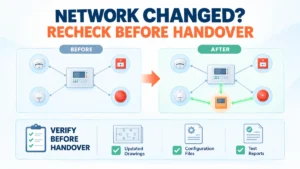
| Problems after modifications | Added devices, altered cable, changed programming, missing records | Compare against pre-modification records and approved drawings |
Keep the categories apart. A communication fault concerns the data path. A wiring fault concerns conductors and insulation. A sensing-related alarm concerns detection conditions. A programming issue concerns configuration.
A Step-by-Step Engineering Troubleshooting Workflow
Short answer: record symptoms, confirm the design, compare installations, verify configuration, inspect wiring, test electrically, assess the environment, then correct and document.
- Record the exact symptoms: Capture panel indications, event logs, affected devices, timestamps and operating conditions.
- Confirm the approved design: Review loop drawings, cable schedules, device lists, manufacturer specifications and approved configuration.
- Compare the two installations: Check cable routes, joints, device types, addresses, connected modules and field conditions.
- Check configuration and compatibility: Verify addressing, device compatibility, programming and configuration records.
- Inspect the field wiring: Use the manufacturer’s approved procedures to examine connections, cable condition and deviations.
- Verify electrical conditions: Qualified personnel should run the required tests with suitable equipment, following manufacturer instructions, applicable codes and safe isolation procedures.
- Evaluate environmental and operational conditions: Check whether faults correlate with machinery, weather or other site events.
- Test and document corrective action: Use the approved commissioning and test procedure, record results and confirm the system is back in its required condition.
Cautions. Maintain fire protection throughout. Manage impairments through approved site procedures. Do not disconnect or bypass devices without authorisation. Do not perform live testing outside qualified, approved methods.
When Should Engineers Suspect the Panel or a Device?
Suspect equipment when evidence points to it, not before.
Equipment-level investigation is justified when:
- Manufacturer-prescribed checks reveal an abnormality.
- A specific device repeatedly fails approved tests.
- The panel reports a fault consistent with a documented hardware issue.
- The same fault follows a component during an approved diagnostic substitution.
- Configuration, wiring and environment have been investigated without resolving the problem.
Replacing a panel or detector without evidence wastes time and can leave the real fault in place. Follow manufacturer procedures, approved impairment controls and safety requirements for any substitution or isolation.
How Addressable Fire Alarm Systems Help with Troubleshooting
An addressable fire alarm panel can identify individual devices, store event history and, where the system supports it, give more specific fault information than a conventional zone-based panel. Conventional fire alarm panels and conventional detectors work on a different architecture: they report by zone circuit, not by device address on a loop.
Addressable detectors and modules therefore narrow the search. They do not remove the need for investigation. The panel cannot automatically identify every wiring defect, environmental influence or installation error, and addressable systems do not eliminate loop faults or guarantee faster fault resolution.
Where the system is a GST fire alarm system, check the documentation for the exact panel and device model. Loop architecture, wiring rules and diagnostics vary between products and must not be assumed.
Practical Lessons for Fire Alarm System Designers and Installers
- Validate cable specifications and routing.
- Follow the approved loop topology.
- Verify device compatibility and electrical loading.
- Keep device addressing accurate.
- Inspect field connections.
- Document installation deviations.
- Follow manufacturer commissioning procedures.
- Preserve configuration records.
- Investigate recurring faults systematically.
- Keep maintenance and impairment records current.
Installation quality, design verification and commissioning are linked. A good design can be undone by an unrecorded route change, and a good installation can be undermined by an incomplete configuration record.
Conclusion
Two loops built from the same parts can behave differently because their installed conditions are not identical. Treat the panel and devices as the last suspects, not the first.
Follow this order: symptoms → installation comparison → wiring verification → configuration checks → environmental investigation → equipment diagnosis. Each step either finds the cause or removes a possibility, and the records you create help the next engineer.
Read Also: Why Two Identical Fire Alarm Loops Can Behave Differently After Installation
Read Also: Smart Fire Detection vs Environmental Noise: Where Does Intelligent Detection Help?